AudioMark

AudioMark

Mark  ·  Loop  ·  Record  ·  Compare  ·  Automate

Precision listening workflow on mobile. A professional A/B comparison, marker, and automation tool for mixing engineers and audio students. Tag key moments, compare tracks with clinical accuracy, and schedule playback. Fully private — no cloud, no ads.

🔒 100% Offline 🎧 A/B Compare 📝 Markers 🎤 Record 📊 LUFS Analysis 🎛️ Playlist Level Match 🔊 Soundcard Select 🎚️ Auto-Gain & Limiter ⏰ Scheduled Playback 🌐 EN · DE · NO
▶ Get it on Google Play
AudioMark — Mark, Loop, Record, Compare

See it in action

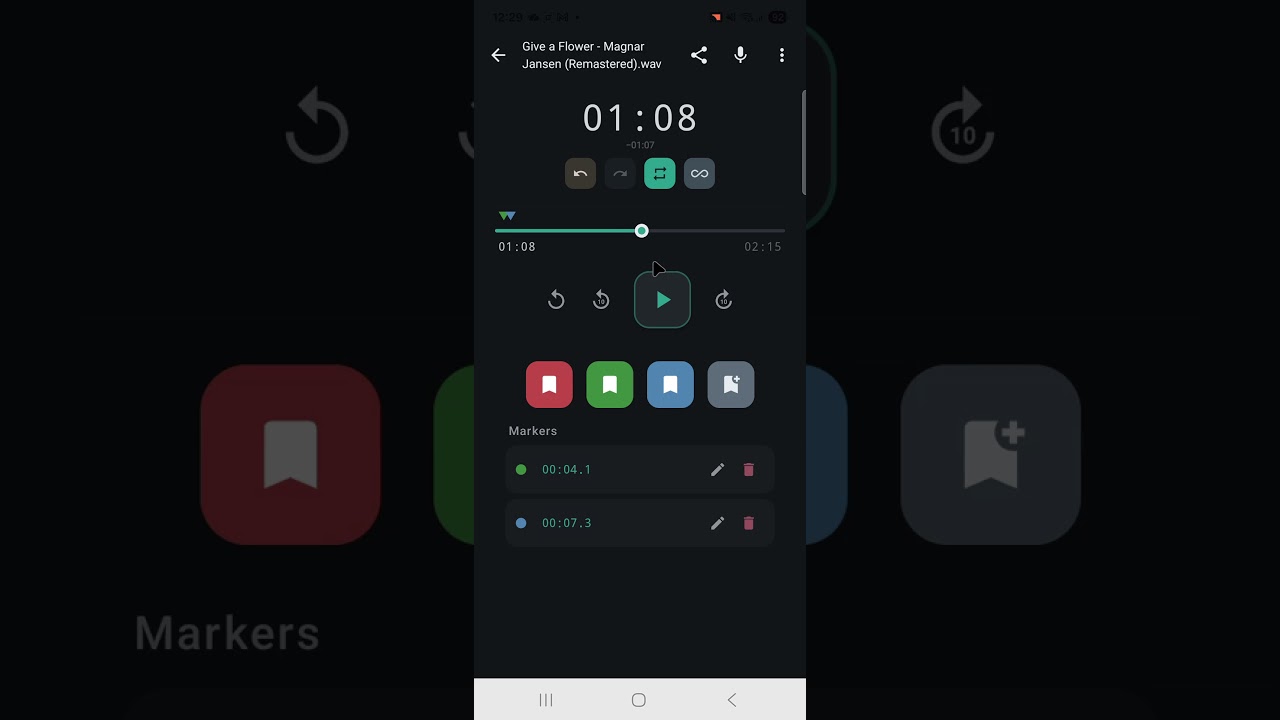
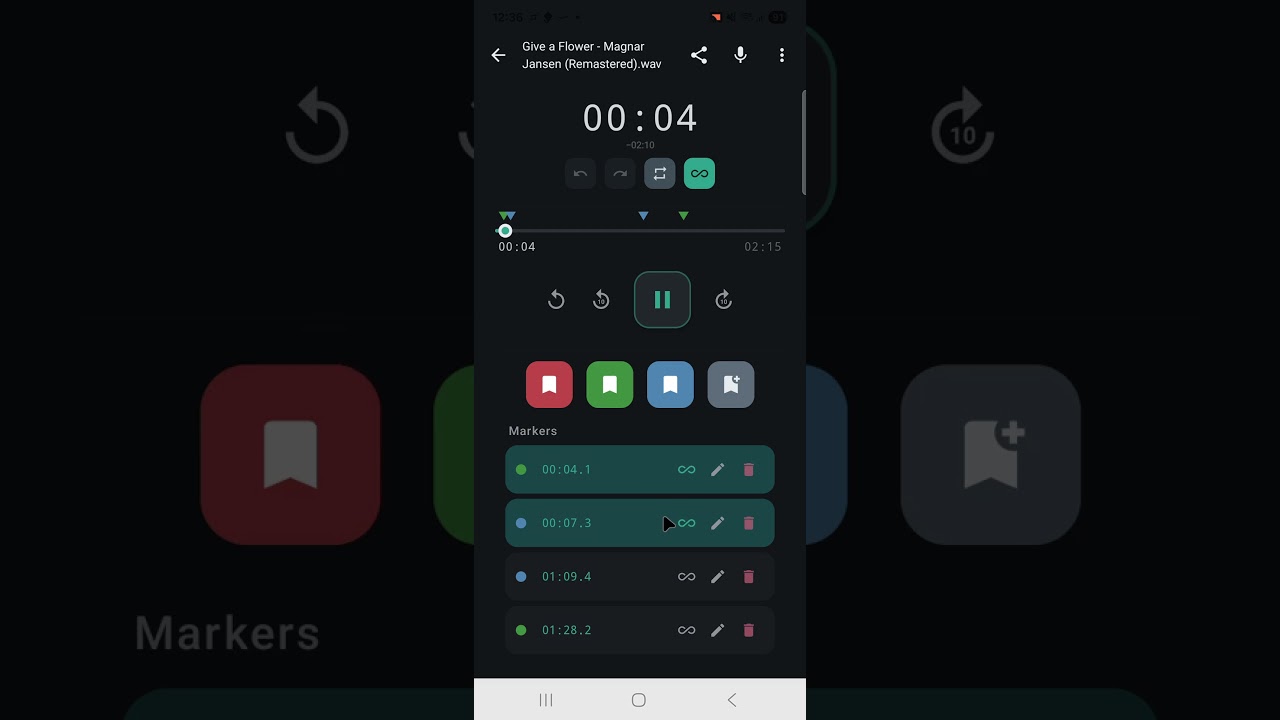
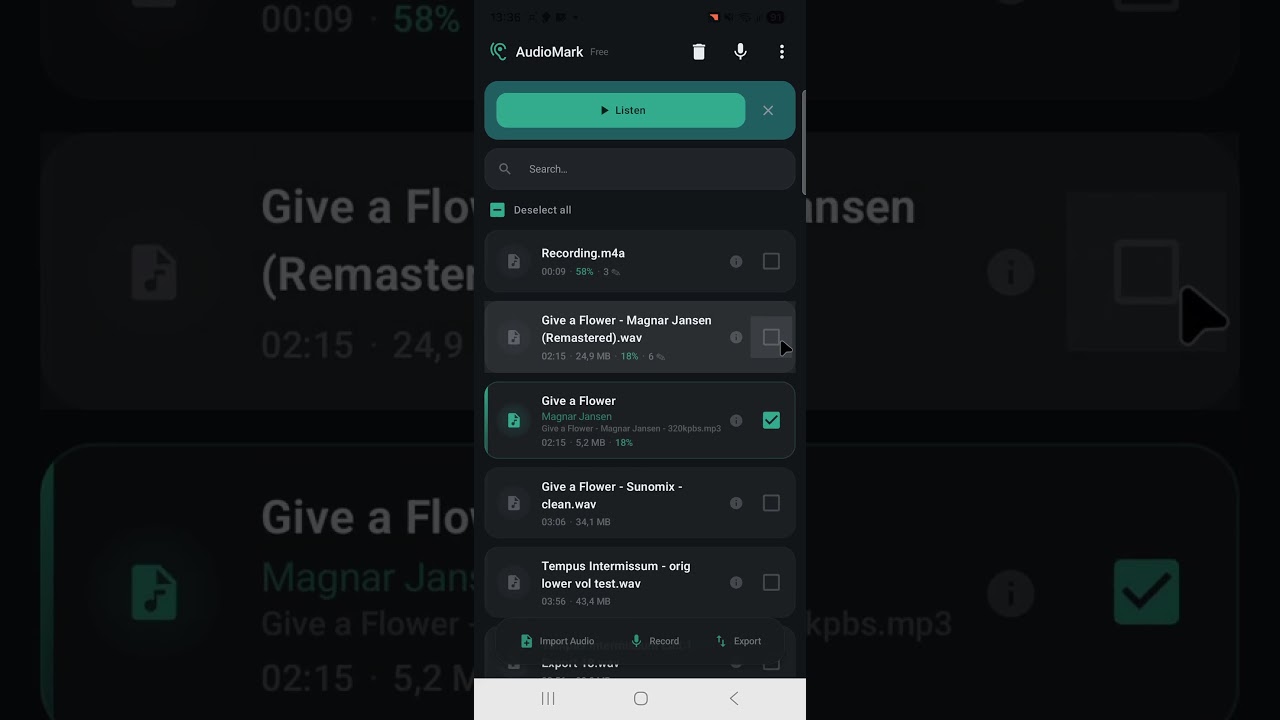
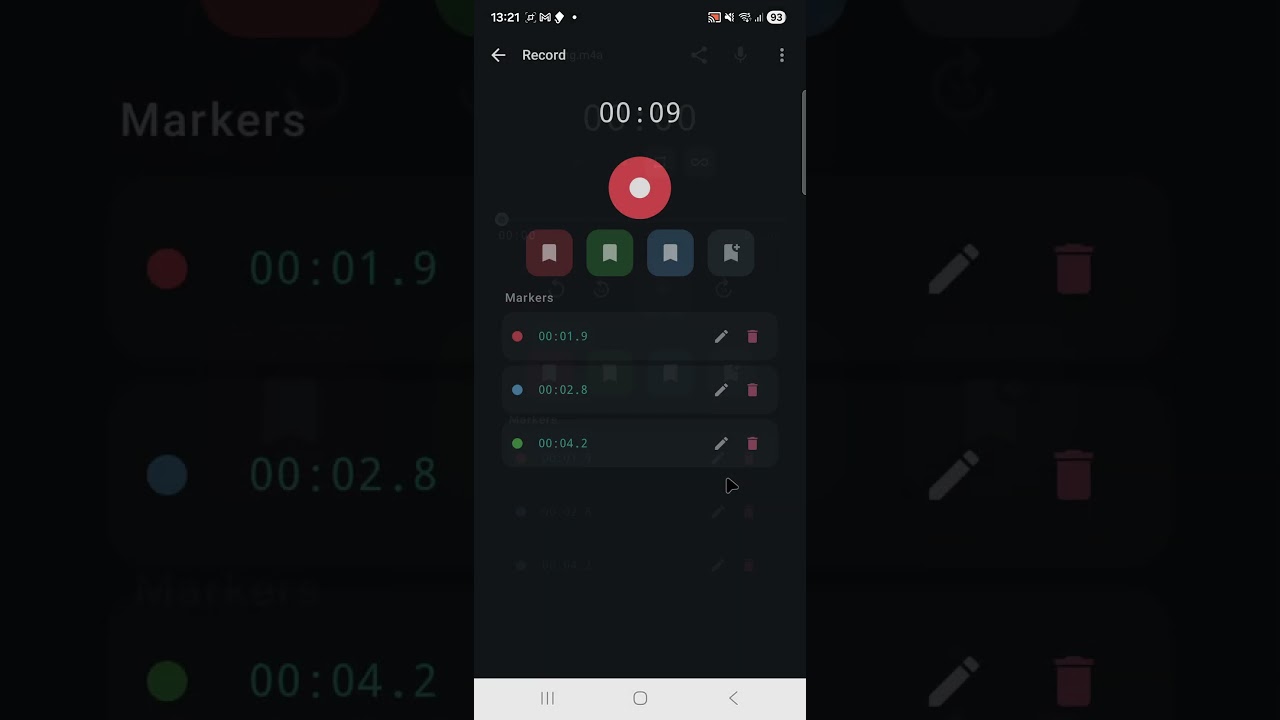
Watch AudioMark's key features — mark, compare, record, loop, and landscape mode.

AudioMark — Quick Intro
Quick IntroWatch on YouTube ↗
AudioMark — Loop & Markers
Loop & MarkersWatch on YouTube ↗
AudioMark — A/B Compare
A/B CompareWatch on YouTube ↗
AudioMark — Recording
RecordingWatch on YouTube ↗
AudioMark — Landscape Mode
Landscape ModeWatch on YouTube ↗

Everything you need

Professional audio tools in your pocket — no cloud, no sign-up, no nonsense.

🎧

Play & Mark

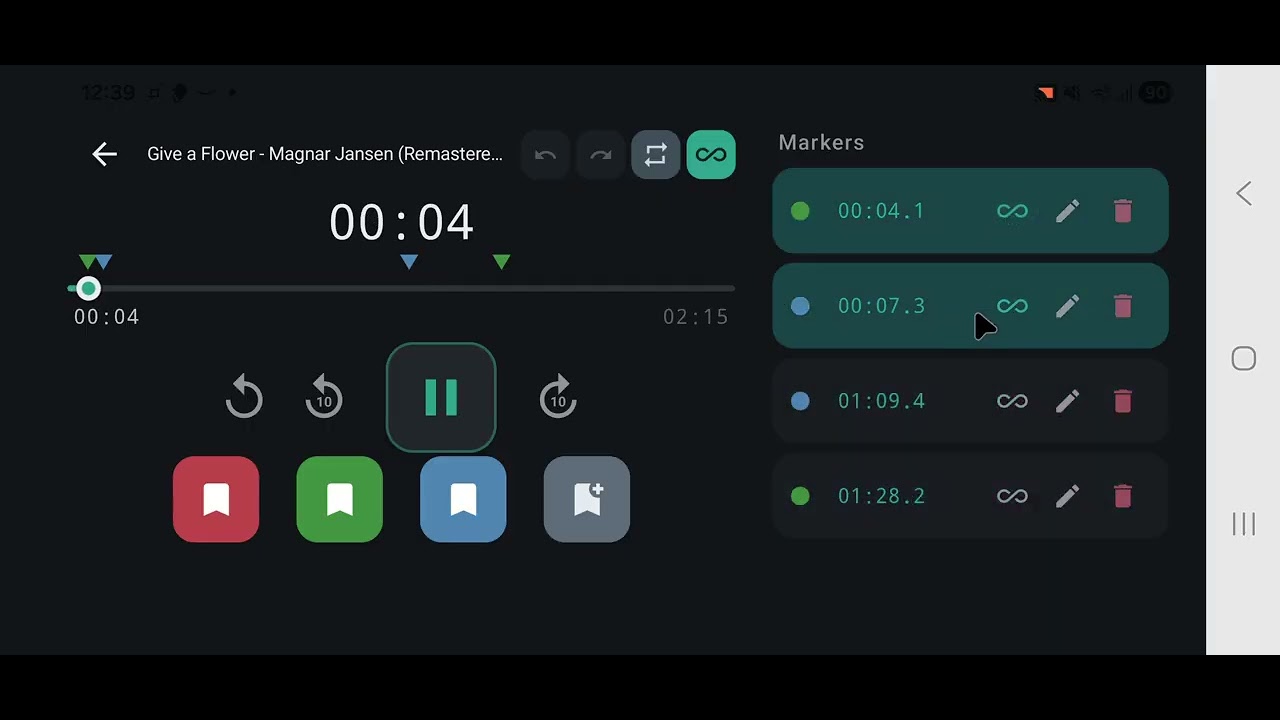
Import MP3, WAV, M4A, or FLAC. Place colour-coded markers while listening. Edit notes, tags, and precise timestamps. Drag to adjust. Full undo/redo.

A/B Compare

Load two tracks, switch instantly with 50 ms equal-power crossfade. LUFS-based level matching (EBU R128) — compare sound, not volume. Blind random test mode.

🎤

Record

Record with real-time level meter and live marker placement. Lossless WAV (16-bit, 44.1 kHz) or compact AAC/M4A. Auto-imported when done.

🔊

Soundcard Selection

Select input and output audio devices — built-in mic, USB audio interfaces, Bluetooth, wired headsets. Auto-fallback when a device is disconnected. Specs shown per device.

🎚️

Auto-Gain & Compressor

Built-in gentle compressor with adaptive threshold, 2:1 ratio, soft knee, and brick-wall limiter at −1 dBFS. Continuous auto-gain (AGC) keeps output peaks consistent. Adjustable input gain (−12 to +12 dB).

🔁

Marker Loop

Loop between any two markers for focused listening — perfect for practicing instruments, studying sections, or reviewing specific passages. Sample-accurate timing.

📋

Playlist Mode

Select 3+ files for sequential playback with track counter and shuffle. Enable Level Match (LM) for a professional FX chain: global balancing, +15dB makeup gain, and brick-wall limiting. Save and load playlists (pro).

Scheduled Playback

Automate your listening. Schedule any saved playlist to trigger at a specific time with a gentle 30-second volume fade-in—perfect for morning routines or automated environment checks.

📊

Audio Analysis

K-weighted LUFS (EBU R128 / ITU-R BS.1770), short-term LUFS (3 s windows), peak dBFS, sample rate, channels, bit depth — all computed locally.

📤

Export & Import

ZIP export with markers + audio. Direct SMB network export to Windows, macOS, Linux. Import audio files, ZIP exports, or from network shares.

📂

Projects (Pro)

Organise files into workspaces. Move files between projects. Cross-project search by name, ID3 metadata, marker notes, and tags.

🎵

ID3 Metadata

Auto-reads artist, title, album, composer, publisher, comment from MP3s (ID3v1/v2, Vorbis, MP4 atoms). Shown everywhere — library, player, lockscreen, search.

📱

Landscape Mode

Full landscape support across all screens — player, library, recorder, and project overview. Two-column layout in landscape for efficient use of screen space.

Built for

Whether you're reviewing mixes, practicing, or studying — AudioMark fits your workflow.

🎛️ Compare multiple mixes
🎸 Practice with looped segments
🤖 Review AI-generated music
📝 Annotate recordings
🎓 Study audio & lectures
🎙️ Review podcast edits
🏠 Import/export via SMB
🔊 Evaluate mastering passes
🎤 Record with USB interfaces
🎚️ Controlled recording levels
⏰ Automate playback routines

🔒 Privacy First

AudioMark works 100% offline with minimal data collection. No accounts, no ads, no in-app analytics, no tracking in the app itself. All your data stays on your device. Google Play Console automatically collects crash reports and performance metrics (see Privacy Policy for details). GDPR compliant. Designed following OWASP MASVS L1 guidelines.

No Cloud No In-App Analytics No Ads No Tracking (in-app) No Timestamps GDPR Compliant OWASP MASVS L1

👤 Built by One Developer

AudioMark is designed, built, and maintained by a single indie developer. It's a complex app — dual audio engine with real-time sync, DSP signal processing, EBU R128 loudness analysis, custom metadata readers, SMB networking, and three player modes in one screen. Every release is verified with a built-in test suite of ~200 test cases running on a real device. If you find a bug, please report it — I read every message and fix issues as fast as I can.

Release History

Follow the journey of AudioMark as we build the best mobile workflow for audio professionals.

v1.0.51 June 5, 2026

Stability & Performance Update

  • ⚙️ Reverted experimental Direct Boot and background logic to maintain 100% system stability across all Android devices.
  • 🚀 Playback reliability restored to the last known stable state (v1.0.47).
  • 🛠️ General maintenance and performance optimizations.
v1.0.47 June 5, 2026

Playlist Mastering Rack (2-Band Glue)

  • 🎛️ Playlist Mastering Rack: Upgraded to a professional 2-band mastering chain (Bass + Mid-High) for more clarity and power in playlist mode.
  • ⛓️ Glue Compressor: Added a dedicated glue compressor stage to smooth out dynamics without pumping, even on heavy tracks.
  • 🚀 Push Drive: Re-engineered makeup gain logic to drive the signal into the mastering rack for a denser, commercial sound.
  • 📍 Reliable State Sync: Resolved an issue where the mastering slider could get stuck when switching playlists or clearing selections.
v1.0.46 June 4, 2026

Android 15 Compliance & Boot Stability

  • 🛡️ Android 15 Compliance: Fixed a critical issue where the app could crash on boot due to new foreground service restrictions on Android 15 and higher.
  • 📍 Boot Reliability: Re-engineered the boot sequence to separate alarm re-scheduling from heavy audio engine components, ensuring a faster and safer startup.
  • 🔐 Service Security: Decoupled service-start logic from system broadcast receivers to meet the latest platform security standards.
v1.0.45 June 3, 2026

Reliable Sync & Scheduler Refinement

  • 📍 Reliable Selection Sync: Implemented a robust synchronization system to ensure playlist selections are saved and loaded correctly, resolving a race condition when switching tracks or stopping playback.
  • ⏰ Scheduled Playback Refinement: Professionalized the Scheduler UI. Improved state handling so that battery optimization and alarm permission status update automatically when returning from system settings.
  • 📋 Smarter Playlist Onboarding: Refined placeholder text to clearly differentiate between having no saved playlists and simply not having one selected for scheduling.
  • ⚡ Performance Tuning: Refined the internal DataStore flow to ensure the player always waits for preference updates to finish before initializing, guaranteeing consistency between the library and the player.
v1.0.43 June 2, 2026

Mastering Console & Predictive Shuffle

  • 🎛️ Playlist Mastering Console: A powerful new analytical overlay that turns your player into a live mastering suite. Monitor LUFS, peaks, and gain reductions in real-time at the bottom of the screen.
  • ⛓️ Professional FX Chain: Implemented a sophisticated multi-stage signal path with Global Balancing, an adjustable +15dB Makeup Gain slider, and your choice of Safe (Peak-Protect) or Pro (Brick-wall Limiter) protection modes.
  • 🔄 Predictive Random (Shuffle): Shuffle logic rewritten to pre-calculate the next random track "one step ahead." See the upcoming reduction and boost values in the console before you even hit skip.
  • 📜 Shuffle History Stack: Fixed navigation logic so the "Previous" button accurately tracks your manual random history, matching the Mastering Console’s history column.
  • ⚡ Instant Gain Toggling: Refined the audio engine so that Level Matching (LM) activates immediately on the current track without waiting for a song change.
v1.0.42 June 1, 2026

Pro Automation & Intelligent Volume

  • ⏰ Pro Scheduled Playback: Automate your listening with precision. Schedule any saved playlist to trigger at a specific time with a gentle 30-second volume fade-in—perfect for morning routines or automated environment checks.
  • 💡 Smart Volume Initialization: New "Intelligent Match" for playlists. The system automatically calculates the recommended boost level to hit the -14.0 LUFS standard the moment you load a new playlist.
  • 🎧 Broadcast-Grade Normalization: Shifted the playlist target to a professional -24.0 LUFS baseline for perfect relative balance, with dynamic headroom-aware makeup gain to match standard system volumes.
  • 🎙️ Enhanced Recording Dynamics: Re-tuned the AGC and limiter thresholds to provide even more headroom, ensuring zero True Peak clipping even in aggressive stereo environments.
  • 📍 Navigation Persistence: Added a new default setting for Level Matching and ensured all professional mastering tools are off by default for a clean out-of-the-box experience.
v1.0.41 May 26, 2026

Markers & Storage Intelligence

  • 📍 Marker List Auto-Scroll: The marker list now automatically follows your listening session. When you add a new marker, the list scrolls it into view with a smooth 50ms delay for visual stability.
  • 📊 Smart Storage Estimator: Added a real-time capacity counter to the Record screen. See exactly how many megabytes you have left and an estimate of how many hours/minutes you can record in your chosen format (WAV or AAC).
  • ✨ MiniPlayer Clarity: Updated the active playback label from \"LISTENING\" to \"PLAYING\" across all supported languages (English, German, Norwegian) for better consistency with modern media standards.
  • 📏 Precision UI: Fixed a layout issue in the Scheduled Playback dialog that caused incorrect padding on certain screen resolutions.
v1.0.40 May 26, 2026

Recording Workflow Refinement

  • 🎙️ Automatic Player Handoff: Fixed a regression where new recordings would not load automatically when initiated from the Single Player, ensuring a smooth transition for multiple takes.
v1.0.39 May 25, 2026

Stability & Navigation Improvements

  • 🛡️ Notification Permission Fix: Resolved a critical issue where the app could close immediately after granting permissions on certain device implementations.
  • 🎨 UI Layering Fix: Cleaned up the file import experience by removing a visual overlay glitch that appeared behind the network share dialog.
  • 📍 Origin-Based Routing: Improved navigation logic to ensure the player always returns you to the correct project or library context you started from.
  • ⏺️ Post-Recording Flow: Fixed a behavior where saving a new recording would bypass the player and jump prematurely to the project overview.
  • 🔄 Callback Sync: Synchronized technical signatures between search and playback engines for a more reliable cross-project workflow.
v1.0.38 May 24, 2026

Major Updates & Android 15 Support

  • ⚡ Hardware Priming Engine: Implementation of a 150ms hardware "warm-up" that ensures completely gapless and skip-free transitions when starting or switching tracks.
  • 📁 SMB/Network Import: Expanded network capabilities to include direct import of audio files and full AudioMark project ZIPs from Windows/SMB shares.
  • 📱 Redesigned MiniPlayer: Relocated controls to the bottom of the screen for better one-handed reachability and accessibility across all devices.
  • 🔍 Integrated Search Overlay: A revamped, high-performance search experience that lets you find markers, files, and tags instantly without shifting the UI layout.
  • 🔄 Format Mismatch Assistant: Smart detection of audio format differences in A/B mode with automated high-quality WAV conversion to guarantee perfect synchronization.
  • 📊 Advanced A/B Visualization: Added visual duration comparisons and time-difference indicators to help you identify track variations more easily.
  • ✨ Android 15 Optimization: Full support for Edge-to-Edge layouts and the latest OS requirements for a modern, immersive user experience.
  • 📜 Perfect Scroll Persistence: Navigation state is now fully preserved, ensuring you never lose your spot in long file lists when returning from the player.
  • 🚀 Zero-Flash Startup: Optimized app initialization and theme syncing to eliminate white screen flashes during launch.
  • 💡 Keep Screen On Setting: Added a dedicated toggle in settings to prevent your device from sleeping during critical listening or recording sessions.
v1.0.31 May 8, 2026

Initial Release

  • First public release of AudioMark.
  • Foundation of the audio playback and marker workflow.
  • Initial Android availability.

Get in Touch

Found a bug, have a feature request, or just want to say hi? I'd love to hear from you.

Ready to listen?

Download AudioMark for free on Google Play. Pro unlocks projects, unlimited files, and saved playlists.

▶ Get it on Google Play